Web Product Releases
Web 2.7.0
5 October 2026
Workspaces, Global Search and Partner Offers
Workspaces, Global Search and Partner Offers
What’s included
This release introduces Workspaces in beta, so portfolio landlords and property managers can bring their team into one account with a single sign in, alongside global search across the app, a new home for partner offers, a tidier settings menu, more detailed document activity, and a round of fixes.
Features:
Workspaces (beta) – one sign in for everyone who manages your portfolio. Invite people to your workspace by email or share a join code with them.
Admin and Member roles – decide who manages the workspace and who works within it, so everyone has the access their role needs.
Property groups – organise properties into groups within a workspace, so each part of your portfolio is easier to manage.
Global search – press ⌘K on Mac or Ctrl+K on Windows to search across August from anywhere in the app, and jump straight to what you need.
Offers – one place to see the offers available to you from August's partners.
Improvements:
Settings menu – redesigned so it is quicker to find the setting you are looking for.
Ended tenancies – documents linked to a tenancy that has finished now show it as Ended.
More detailed document activity – the activity history now records links, auto-shares, and changes to access and privacy, so you can see exactly what happened to a document and when.
MTD – mortgage interest and fees shown after net profit (20% tax relief), not as expenses.
Fixes:
Server errors no longer sign you out.
Deleting a tenancy now returns you to the tenancy list.
Clearing a tenancy deposit now removes it.
Large portfolio of documents now behaves properly.
Opening a document from search or a link opens that document, not the newest one.
Workspaces, Global Search and Partner Offers
What’s included
This release introduces Workspaces in beta, so portfolio landlords and property managers can bring their team into one account with a single sign in, alongside global search across the app, a new home for partner offers, a tidier settings menu, more detailed document activity, and a round of fixes.
Features:
Workspaces (beta) – one sign in for everyone who manages your portfolio. Invite people to your workspace by email or share a join code with them.
Admin and Member roles – decide who manages the workspace and who works within it, so everyone has the access their role needs.
Property groups – organise properties into groups within a workspace, so each part of your portfolio is easier to manage.
Global search – press ⌘K on Mac or Ctrl+K on Windows to search across August from anywhere in the app, and jump straight to what you need.
Offers – one place to see the offers available to you from August's partners.
Improvements:
Settings menu – redesigned so it is quicker to find the setting you are looking for.
Ended tenancies – documents linked to a tenancy that has finished now show it as Ended.
More detailed document activity – the activity history now records links, auto-shares, and changes to access and privacy, so you can see exactly what happened to a document and when.
MTD – mortgage interest and fees shown after net profit (20% tax relief), not as expenses.
Fixes:
Server errors no longer sign you out.
Deleting a tenancy now returns you to the tenancy list.
Clearing a tenancy deposit now removes it.
Large portfolio of documents now behaves properly.
Opening a document from search or a link opens that document, not the newest one.
Web 2.6.0
11 September 2026
Mileage, Tenant and Tenancy Pages, a Notification Centre and a Redesigned Navigation
Mileage, Tenant and Tenancy Pages, a Notification Centre and a Redesigned Navigation
What’s included
This release adds mileage tracking, dedicated pages for tenants and tenancies, a notification centre and editable maintenance history, alongside a collapsible navigation sidebar with sub menus, plus harmonised toolbars and filters across the app, a portfolio filter on documents, and a couple of renames.
Features:
Mileage – record the journeys you make for your properties and keep them alongside the rest of your costs.
Tenants page – every tenant across your portfolio in one list.
Tenant details page – one view for a single tenant, bringing their tenancy, payments and documents together.
Tenancies page – every tenancy across your portfolio in one list.
Notification centre – all your mobile notifications now visible in the web product.
Maintenance history and editing – see the full history of a maintenance job, and change entries after they have been recorded.
Collapsible navigation sidebar – collapse the sidebar when you want more room for the page you are on.
Sub menus in the navigation sidebar – sections now expand to show what is inside them, so it takes fewer clicks to get where you are going.
Improvements:
Harmonised toolbars – every toolbar now uses the same component, so they look and behave the same wherever you are in the app.
Dropdowns, filters, selectors and pagination – rebuilt on the new August Design System, so they behave consistently across every page.
Portfolio filter on documents – filter your documents by portfolio, the same way you already can elsewhere.
Payments are now Income – renamed to match how the money coming in is actually described.
Diary is now Notes – renamed to make it clearer what it holds.
Document pre-sharing warning – you now see what you are about to share, and who with, before a document leaves your account.
Mileage, Tenant and Tenancy Pages, a Notification Centre and a Redesigned Navigation
What’s included
This release adds mileage tracking, dedicated pages for tenants and tenancies, a notification centre and editable maintenance history, alongside a collapsible navigation sidebar with sub menus, plus harmonised toolbars and filters across the app, a portfolio filter on documents, and a couple of renames.
Features:
Mileage – record the journeys you make for your properties and keep them alongside the rest of your costs.
Tenants page – every tenant across your portfolio in one list.
Tenant details page – one view for a single tenant, bringing their tenancy, payments and documents together.
Tenancies page – every tenancy across your portfolio in one list.
Notification centre – all your mobile notifications now visible in the web product.
Maintenance history and editing – see the full history of a maintenance job, and change entries after they have been recorded.
Collapsible navigation sidebar – collapse the sidebar when you want more room for the page you are on.
Sub menus in the navigation sidebar – sections now expand to show what is inside them, so it takes fewer clicks to get where you are going.
Improvements:
Harmonised toolbars – every toolbar now uses the same component, so they look and behave the same wherever you are in the app.
Dropdowns, filters, selectors and pagination – rebuilt on the new August Design System, so they behave consistently across every page.
Portfolio filter on documents – filter your documents by portfolio, the same way you already can elsewhere.
Payments are now Income – renamed to match how the money coming in is actually described.
Diary is now Notes – renamed to make it clearer what it holds.
Document pre-sharing warning – you now see what you are about to share, and who with, before a document leaves your account.
Web 2.5.0
4 August 2026
Diary, New Sign-In Methods, Bulk Import for Portfolio Landlords and a Compliance Marketplace
Diary, New Sign-In Methods, Bulk Import for Portfolio Landlords and a Compliance Marketplace
What’s included
This release adds the Diary, a single feed of activity across your portfolio, alongside new sign-in methods, a compliance marketplace with pinnable widgets, AI-powered bulk import, and shared-in-account ownership for MTD, plus paid dates on expenses and a round of fixes.
Features:
Diary – one feed of everything happening across your portfolio, with a new widget on the home screen.
New sign-in methods – choose how you sign in, with email and password options rather than one fixed path. Two-factor authentication is held back for now.
Compliance marketplace – pick the compliance tasks that apply to your properties, and edit your own copy of each without affecting anyone else.
Compliance widgets – pin key certificates as featured, and record which requirement each one satisfies.
Bulk import for properties and tenancies – no tidy spreadsheet needed, AI reads your documents and imports them for you. Available on the AI-boosted version of Portfolio Plus only.
Shared-in-account ownership – two people in one account who each file their own tax return can now each submit their own share through Making Tax Digital.
Improvements:
Paid dates on expenses and payments – record when an expense was actually paid, with MTD expenses now following the cash basis.
Document wizard – now names what it created, rather than a generic "Linked it to your records".
Fixes:
Weekly and fortnightly rent now schedules on the correct dates.
Finances no longer hangs when a filter is changed.
The back button now works properly in Making Tax Digital.
Upload errors are now readable rather than raw provider errors.
Tenant names now show on the payment detail page.
Assigning payments or expenses now shows the real reason when it fails.
HMRC status now shows without expanding an organisation.
Portfolio Plus subscribers no longer see downgrade prompts.
Wide tables now keep the first column pinned when scrolled.
Diary, New Sign-In Methods, Bulk Import for Portfolio Landlords and a Compliance Marketplace
What’s included
This release adds the Diary, a single feed of activity across your portfolio, alongside new sign-in methods, a compliance marketplace with pinnable widgets, AI-powered bulk import, and shared-in-account ownership for MTD, plus paid dates on expenses and a round of fixes.
Features:
Diary – one feed of everything happening across your portfolio, with a new widget on the home screen.
New sign-in methods – choose how you sign in, with email and password options rather than one fixed path. Two-factor authentication is held back for now.
Compliance marketplace – pick the compliance tasks that apply to your properties, and edit your own copy of each without affecting anyone else.
Compliance widgets – pin key certificates as featured, and record which requirement each one satisfies.
Bulk import for properties and tenancies – no tidy spreadsheet needed, AI reads your documents and imports them for you. Available on the AI-boosted version of Portfolio Plus only.
Shared-in-account ownership – two people in one account who each file their own tax return can now each submit their own share through Making Tax Digital.
Improvements:
Paid dates on expenses and payments – record when an expense was actually paid, with MTD expenses now following the cash basis.
Document wizard – now names what it created, rather than a generic "Linked it to your records".
Fixes:
Weekly and fortnightly rent now schedules on the correct dates.
Finances no longer hangs when a filter is changed.
The back button now works properly in Making Tax Digital.
Upload errors are now readable rather than raw provider errors.
Tenant names now show on the payment detail page.
Assigning payments or expenses now shows the real reason when it fails.
HMRC status now shows without expanding an organisation.
Portfolio Plus subscribers no longer see downgrade prompts.
Wide tables now keep the first column pinned when scrolled.
Web 2.4.0
24 July 2026
Xero Integration, Multiple Tenants and Finance Charts on Dashboard
Xero Integration, Multiple Tenants and Finance Charts on Dashboard
What’s included
This release adds a Xero integration, support for multiple tenants on a tenancy, and finance charts, alongside navigation customisation, MTD and support improvements, a new lime and black brand look, and several fixes.
Features:
Xero integration – connect Xero from a new screen in Finances and export or import expenses, with a two-step wizard in the expenses drawer, live sync progress, and a disconnect flow.
Multiple tenants per tenancy – add or remove additional tenants, capture phone numbers with a country selector, send app invites, and reassign the lead tenant. Additional tenants appear on the tenancy, in the Tenancies widget, and in document sharing.
Message all tenants – landlords can now message every tenant on a tenancy, not just the lead through broadcast messaging.
Finance charts on dashboard – cashflow, expense breakdown and per-property chart widgets on the Finances screen.
Customisable main navigation – add destinations to and reorder the main nav, including MTD and the matrices.
Delete a manual payment – remove a manually created payment directly from the payment detail screen.
Bank feed filter – filter the bank feed by matched or unmatched transactions.
Improvements:
HMRC connections – a connection without a property business is now surfaced as needing action.
Matrices – can now be enlarged to fullscreen.
Contact support – renamed, with support hours shown and a new option to book a call.
Phone verification – onboarding now includes an additional security check, with a hosted version for mobile.
Document upload – uploading is now blocked in the upload modal when a plan limit is reached, with clear messaging.
UI polish:
New brand look – lime and black throughout, with a light and dark adaptive favicon, an updated theme colour, dark mode fixes, and retirement of the legacy purple-blue.
Tenant invites – the invite toggle is now lime rather than purple, with a consistent one-row-per-tenant layout.
Fixes:
Server errors when editing a payment are now shown clearly, with a refresh on failure.
Message delivery statuses now update as they change.
Adding yourself as a tenant is now caught upfront, with clearer explanations on the contact fields.
Xero Integration, Multiple Tenants and Finance Charts on Dashboard
What’s included
This release adds a Xero integration, support for multiple tenants on a tenancy, and finance charts, alongside navigation customisation, MTD and support improvements, a new lime and black brand look, and several fixes.
Features:
Xero integration – connect Xero from a new screen in Finances and export or import expenses, with a two-step wizard in the expenses drawer, live sync progress, and a disconnect flow.
Multiple tenants per tenancy – add or remove additional tenants, capture phone numbers with a country selector, send app invites, and reassign the lead tenant. Additional tenants appear on the tenancy, in the Tenancies widget, and in document sharing.
Message all tenants – landlords can now message every tenant on a tenancy, not just the lead through broadcast messaging.
Finance charts on dashboard – cashflow, expense breakdown and per-property chart widgets on the Finances screen.
Customisable main navigation – add destinations to and reorder the main nav, including MTD and the matrices.
Delete a manual payment – remove a manually created payment directly from the payment detail screen.
Bank feed filter – filter the bank feed by matched or unmatched transactions.
Improvements:
HMRC connections – a connection without a property business is now surfaced as needing action.
Matrices – can now be enlarged to fullscreen.
Contact support – renamed, with support hours shown and a new option to book a call.
Phone verification – onboarding now includes an additional security check, with a hosted version for mobile.
Document upload – uploading is now blocked in the upload modal when a plan limit is reached, with clear messaging.
UI polish:
New brand look – lime and black throughout, with a light and dark adaptive favicon, an updated theme colour, dark mode fixes, and retirement of the legacy purple-blue.
Tenant invites – the invite toggle is now lime rather than purple, with a consistent one-row-per-tenant layout.
Fixes:
Server errors when editing a payment are now shown clearly, with a refresh on failure.
Message delivery statuses now update as they change.
Adding yourself as a tenant is now caught upfront, with clearer explanations on the contact fields.
Web 2.3.0
17 July 2026
Tenancy Dashboard, Batch Uploads, and MTD Submissions
Tenancy Dashboard, Batch Uploads, and MTD Submissions
What’s included
This release adds a read-only tenancy dashboard, batch document upload, and live Making Tax Digital submissions, alongside reconciliation and workflow improvements, a colour touch-up in dark mode, and several fixes.
Features:
Tenancy dashboard – a read-only overview of a tenancy that mirrors iOS.
Making Tax Digital submissions – MTD submissions are now live. Every landlord can browse their MTD figures and HMRC connection, while connecting to HMRC and submitting a quarter require the MTD enabled plans.
Batch document upload – upload and AI-review several documents at once, with per-file review, a bulk finish for the batch, and a completion screen.
Document approval for share-link viewers – recipients can approve or acknowledge a shared document straight from the share page, and landlords see per-recipient status, including who is still awaiting a response.
Manual payment methods – marking a payment as paid without a matched transaction now offers cash, bank transfer, cheque or other, with an optional reference.
Homescreen add button – a quick-add menu covering property, tenancy, expense, payment, document, reminder, maintenance and contact.
Properties list – a new list view and search for larger rental portfolios.
NPS survey – to help capture your feedback on the platform to help us to continue to make it better for you.
Improvements:
Reconciliation – match a single payment or expense against several transactions.
HMRC connection management – moved to Settings → Organisations, with a guided connect flow.
Maintenance list – search, property and status filters now sit in the header for larger portfolios.
Documents – a type filter dropdown plus a name search bar for larger portfolios.
Expenses – landlords with more than one property business can choose which business a general expense belongs to.
Create payment drawer – now explains that it records a payment outside the tenancy's normal schedule, rather than reconciling a scheduled period, and has been restyled to a single column.
UI polish:
Dark mode – the profile avatar and add button now stay lime.
Review payment pills – now salmon, to set them apart from Upcoming.
Fixes:
Large-format PDFs are now diverted to the no-AI upload path instead of failing.
Copy cleanup on the 404 page.
MTD organisation and tax-year filters now render correctly, having previously been a broken dropdown and a non-functional button.
Dragging a property between organisation columns no longer slides the dragged card behind the columns.
Tenancy Dashboard, Batch Uploads, and MTD Submissions
What’s included
This release adds a read-only tenancy dashboard, batch document upload, and live Making Tax Digital submissions, alongside reconciliation and workflow improvements, a colour touch-up in dark mode, and several fixes.
Features:
Tenancy dashboard – a read-only overview of a tenancy that mirrors iOS.
Making Tax Digital submissions – MTD submissions are now live. Every landlord can browse their MTD figures and HMRC connection, while connecting to HMRC and submitting a quarter require the MTD enabled plans.
Batch document upload – upload and AI-review several documents at once, with per-file review, a bulk finish for the batch, and a completion screen.
Document approval for share-link viewers – recipients can approve or acknowledge a shared document straight from the share page, and landlords see per-recipient status, including who is still awaiting a response.
Manual payment methods – marking a payment as paid without a matched transaction now offers cash, bank transfer, cheque or other, with an optional reference.
Homescreen add button – a quick-add menu covering property, tenancy, expense, payment, document, reminder, maintenance and contact.
Properties list – a new list view and search for larger rental portfolios.
NPS survey – to help capture your feedback on the platform to help us to continue to make it better for you.
Improvements:
Reconciliation – match a single payment or expense against several transactions.
HMRC connection management – moved to Settings → Organisations, with a guided connect flow.
Maintenance list – search, property and status filters now sit in the header for larger portfolios.
Documents – a type filter dropdown plus a name search bar for larger portfolios.
Expenses – landlords with more than one property business can choose which business a general expense belongs to.
Create payment drawer – now explains that it records a payment outside the tenancy's normal schedule, rather than reconciling a scheduled period, and has been restyled to a single column.
UI polish:
Dark mode – the profile avatar and add button now stay lime.
Review payment pills – now salmon, to set them apart from Upcoming.
Fixes:
Large-format PDFs are now diverted to the no-AI upload path instead of failing.
Copy cleanup on the 404 page.
MTD organisation and tax-year filters now render correctly, having previously been a broken dropdown and a non-functional button.
Dragging a property between organisation columns no longer slides the dragged card behind the columns.
Web 2.2.0
7 July 2026
Reminders, Bulk Payments, and Upload Improvements
Reminders, Bulk Payments, and Upload Improvements
What’s included
This release adds organisation type conversion, bulk payment editing, and a smarter reminders workflow, alongside a set of upload improvements, several fixes, and a UI colour refresh.
Improvements:
Organisation type conversion – landlords can now convert an organisation between individual and limited company.
Upload size limits – uploads are now capped at 50MB. Oversized files can still be uploaded without AI analysis.
Better upload wait experience – clearer progress feedback while the AI reads large documents, with uploads continuing smoothly.
Bulk edit payments – select several payments straight from the payments list and edit their amounts in one go, with a heads-up when the selected amounts differ.
Reminders – reminders can now be marked as done or completed, and reopened or renewed. The reminders page also gains a time filter and an Active/Completed toggle.
UI polish:
Colour refresh – pills, chips and badges have moved from blue and purple to our lime brand colour, with info banners and tips restyled to match.
Maintenance status filter – now shows every status as icon pills.
Reminders page – refined toggles and buttons.
Fixes:
Matching one bank transaction to several payments or expenses is now more reliable, with no more occasional errors when moving a transaction from one to another.
Logged-out visitors to a protected page are now sent to the login page instead of hitting an error.
Fixed occasional errors caused by unexpected server responses.
The setup card on the home page now opens the add-property form instead of leading to a dead page.
The Help link in the sidebar now takes you to contact support, having previously gone to account settings.
Viewing a document on desktop now fits the screen properly instead of scrolling the whole page.
Reminder date badges only show the year when it is not the current year.
Reminders, Bulk Payments, and Upload Improvements
What’s included
This release adds organisation type conversion, bulk payment editing, and a smarter reminders workflow, alongside a set of upload improvements, several fixes, and a UI colour refresh.
Improvements:
Organisation type conversion – landlords can now convert an organisation between individual and limited company.
Upload size limits – uploads are now capped at 50MB. Oversized files can still be uploaded without AI analysis.
Better upload wait experience – clearer progress feedback while the AI reads large documents, with uploads continuing smoothly.
Bulk edit payments – select several payments straight from the payments list and edit their amounts in one go, with a heads-up when the selected amounts differ.
Reminders – reminders can now be marked as done or completed, and reopened or renewed. The reminders page also gains a time filter and an Active/Completed toggle.
UI polish:
Colour refresh – pills, chips and badges have moved from blue and purple to our lime brand colour, with info banners and tips restyled to match.
Maintenance status filter – now shows every status as icon pills.
Reminders page – refined toggles and buttons.
Fixes:
Matching one bank transaction to several payments or expenses is now more reliable, with no more occasional errors when moving a transaction from one to another.
Logged-out visitors to a protected page are now sent to the login page instead of hitting an error.
Fixed occasional errors caused by unexpected server responses.
The setup card on the home page now opens the add-property form instead of leading to a dead page.
The Help link in the sidebar now takes you to contact support, having previously gone to account settings.
Viewing a document on desktop now fits the screen properly instead of scrolling the whole page.
Reminder date badges only show the year when it is not the current year.
Web 2.1.0
1 July 2026
Granular maintenance, bank management and interface polish
Granular maintenance, bank management and interface polish
What’s included
This release adds more detail to maintenance tracking, brings bank account management in line with the iOS app, and includes a broad sweep of interface polish across the web app.
Feature:
Maintenance reports now support more granular statuses on web, so you can see exactly where each issue stands rather than only whether it is open or closed.
Bank account management on web is now in line with the iOS app, giving you the same controls for connecting, editing and removing accounts across both.
Unread support replies now appear as a badge in the navigation, so you can tell at a glance when we have responded.
Improvements and UI polish:
Finances filters have moved to the top right, next to Export, matching the layout you already know from Documents.
Maintenance report photos are now encoded as WebP, which shrinks upload sizes and makes them faster to send.
Status colours have moved from purple to blue across reminders, property type and MTD pills, as well as the payment-review badge, for a more consistent look throughout.
Loaders and spinners during onboarding now use the primary text colour rather than brand indigo, for a cleaner and more consistent feel.
Documents: we have removed some contradictory sharing notes and added a green-check access pill that clearly shows who has access.
The whole property card is now clickable, so you can open a property from anywhere on the card rather than a single link.
Compliance: certificate expiry dates now show on first load through inline history, so you can see what is expiring without waiting or refreshing.
Fixes:
The bank feed now re-syncs automatically if assigning or unassigning a transaction fails, keeping your reconciliation accurate.
We have raised the upload size limit to 8MB, fixing an issue where large maintenance uploads could fail.
Granular maintenance, bank management and interface polish
What’s included
This release adds more detail to maintenance tracking, brings bank account management in line with the iOS app, and includes a broad sweep of interface polish across the web app.
Feature:
Maintenance reports now support more granular statuses on web, so you can see exactly where each issue stands rather than only whether it is open or closed.
Bank account management on web is now in line with the iOS app, giving you the same controls for connecting, editing and removing accounts across both.
Unread support replies now appear as a badge in the navigation, so you can tell at a glance when we have responded.
Improvements and UI polish:
Finances filters have moved to the top right, next to Export, matching the layout you already know from Documents.
Maintenance report photos are now encoded as WebP, which shrinks upload sizes and makes them faster to send.
Status colours have moved from purple to blue across reminders, property type and MTD pills, as well as the payment-review badge, for a more consistent look throughout.
Loaders and spinners during onboarding now use the primary text colour rather than brand indigo, for a cleaner and more consistent feel.
Documents: we have removed some contradictory sharing notes and added a green-check access pill that clearly shows who has access.
The whole property card is now clickable, so you can open a property from anywhere on the card rather than a single link.
Compliance: certificate expiry dates now show on first load through inline history, so you can see what is expiring without waiting or refreshing.
Fixes:
The bank feed now re-syncs automatically if assigning or unassigning a transaction fails, keeping your reconciliation accurate.
We have raised the upload size limit to 8MB, fixing an issue where large maintenance uploads could fail.
Web 2.0.0
7 June 2026
A whole new August
A whole new August
What’s included
This is our first major version update. We have rebuilt the entire interface around a new design system, alongside a set of features that change how you reconcile money, handle documents, and stay on top of tax.
A new design system:
New look and feel. A black and lime theme runs throughout. Primary buttons are now black, with lime reserved for the things you select or need to notice, including checkboxes, selected states, badges, and avatars.
A new navigation shell, now the permanent default, with hierarchical breadcrumbs so you always know where you are in your portfolio.
Reusable side drawers that slide in from the right, flatter cards with softer corners, and sentence-case labels throughout for a more readable interface.
Bank feed and reconciliation:
A new bank feed brings your transactions straight into August.
A dynamic reconcile drawer lets you split transactions, match them inline, unassign anything caught by mistake, and accept suggested matches, with filtering by source account so you can work one account at a time.
Document AI:
An upload-first automation flow that reads documents as you add them, showing live extraction and findings on screen.
Auto-fill pills drop the extracted details straight into your forms, and you can set up a whole tenancy from a single contract. This shows the high level of automation within August.
In-app PDF previews and a stepped upload and edit wizard keep the whole process quick.
Making Tax Digital:
A redesigned MTD flow with a clearer quarterly period-type selector.
Your cumulative HMRC position is back in view, so you can see where you stand across the year at any point.
Messaging:
Tenants can now start a conversation with their landlord rather than only replying to one.
Documents:
New property and tenancy filters in the Documents title bar, applied server-side so large document sets stay fast.
Privacy:
A new cookie consent bar puts you in control of analytics tracking.
Fixes:
Restored the cumulative HMRC position so MTD figures reconcile correctly across the tax year.
Analytics now respect your cookie consent choices.
A whole new August
What’s included
This is our first major version update. We have rebuilt the entire interface around a new design system, alongside a set of features that change how you reconcile money, handle documents, and stay on top of tax.
A new design system:
New look and feel. A black and lime theme runs throughout. Primary buttons are now black, with lime reserved for the things you select or need to notice, including checkboxes, selected states, badges, and avatars.
A new navigation shell, now the permanent default, with hierarchical breadcrumbs so you always know where you are in your portfolio.
Reusable side drawers that slide in from the right, flatter cards with softer corners, and sentence-case labels throughout for a more readable interface.
Bank feed and reconciliation:
A new bank feed brings your transactions straight into August.
A dynamic reconcile drawer lets you split transactions, match them inline, unassign anything caught by mistake, and accept suggested matches, with filtering by source account so you can work one account at a time.
Document AI:
An upload-first automation flow that reads documents as you add them, showing live extraction and findings on screen.
Auto-fill pills drop the extracted details straight into your forms, and you can set up a whole tenancy from a single contract. This shows the high level of automation within August.
In-app PDF previews and a stepped upload and edit wizard keep the whole process quick.
Making Tax Digital:
A redesigned MTD flow with a clearer quarterly period-type selector.
Your cumulative HMRC position is back in view, so you can see where you stand across the year at any point.
Messaging:
Tenants can now start a conversation with their landlord rather than only replying to one.
Documents:
New property and tenancy filters in the Documents title bar, applied server-side so large document sets stay fast.
Privacy:
A new cookie consent bar puts you in control of analytics tracking.
Fixes:
Restored the cumulative HMRC position so MTD figures reconcile correctly across the tax year.
Analytics now respect your cookie consent choices.
Web 1.6.6
8 May 2026
Technical update for MTD
Technical update for MTD
Fixes
Minor technical update required for HMRC MTD.
Technical update for MTD
Fixes
Minor technical update required for HMRC MTD.
Web 1.6.5
7 May 2026
Master Views and Landlord-Tenant Messaging
Master Views and Landlord-Tenant Messaging
What’s included
Three new landlord master views:
Documents matrix — see every document across every property, tenancy, tenant, and contact in one grid. Click cells to share or unshare, then review a summary of who'll be added or removed before saving.
Compliance matrix — landlord-wide view of every compliance task across your portfolio, with quick links straight to the task on each property.
Payments matrix — your full rent timeline at a glance: tenancies down the side, months across the top, with today highlighted and outstanding-only filtering.
Messaging communication center:
New /messages area with a side-by-side conversation list and thread view.
Start new conversations from anywhere via a floating button.
Archive conversations instead of deleting them, with a collapsible archived section.
"Message about this issue" button on maintenance reports opens a conversation tied to that report.
Messages widget now appears on the home screen for both landlords and tenants.
Smarter document sharing:
Per-recipient control: choose Off, Linked, or Shared for each tenant or contact and Auto share for whole properties or tenancies.
New consolidated sharing widget on the document detail page shows exactly who has access.
Fixes
Fixed a bug where clicking nav links could freeze the app after visiting Documents, Messages, or Compliance pages.
Tax-year debug link now visible whenever the panel is open.
Focus rings no longer linger after clicking with a mouse.
Master Views and Landlord-Tenant Messaging
What’s included
Three new landlord master views:
Documents matrix — see every document across every property, tenancy, tenant, and contact in one grid. Click cells to share or unshare, then review a summary of who'll be added or removed before saving.
Compliance matrix — landlord-wide view of every compliance task across your portfolio, with quick links straight to the task on each property.
Payments matrix — your full rent timeline at a glance: tenancies down the side, months across the top, with today highlighted and outstanding-only filtering.
Messaging communication center:
New /messages area with a side-by-side conversation list and thread view.
Start new conversations from anywhere via a floating button.
Archive conversations instead of deleting them, with a collapsible archived section.
"Message about this issue" button on maintenance reports opens a conversation tied to that report.
Messages widget now appears on the home screen for both landlords and tenants.
Smarter document sharing:
Per-recipient control: choose Off, Linked, or Shared for each tenant or contact and Auto share for whole properties or tenancies.
New consolidated sharing widget on the document detail page shows exactly who has access.
Fixes
Fixed a bug where clicking nav links could freeze the app after visiting Documents, Messages, or Compliance pages.
Tax-year debug link now visible whenever the panel is open.
Focus rings no longer linger after clicking with a mouse.
Web 1.6.4
24 April 2026
Onboarding and HMRC Making Tax Digital
Onboarding and HMRC Making Tax Digital
What’s included
Refreshed onboarding - new look across the sign-up and login flows: split layout, brand colours, dark mode, and a testimonial panel. Sign-up and login now live at clean, dedicated URLs.
Calculators - 17 new calculators and checkers now available inside the web product.
Document activity - See your three most recent activity events at a glance, with a "See all" link to the full history.
Expired & revoked document landing page - Further improvements to the document landing page when someone opens a document that's no longer available.
Onboarding and HMRC Making Tax Digital
What’s included
Refreshed onboarding - new look across the sign-up and login flows: split layout, brand colours, dark mode, and a testimonial panel. Sign-up and login now live at clean, dedicated URLs.
Calculators - 17 new calculators and checkers now available inside the web product.
Document activity - See your three most recent activity events at a glance, with a "See all" link to the full history.
Expired & revoked document landing page - Further improvements to the document landing page when someone opens a document that's no longer available.
Web 1.6.3
17 April 2026
One-Time Document View
One-Time Document View
What’s included
One-time view landing page - Clearer landing page experience for recipients opening a document via a one-time secure link.
One-Time Document View
What’s included
One-time view landing page - Clearer landing page experience for recipients opening a document via a one-time secure link.
Web 1.6.2
8 April 2026
MTD Enhancements, Subscription Limits, and Maintenance Feature Updates
MTD Enhancements, Subscription Limits, and Maintenance Feature Updates
This minor release brings significant improvements to Making Tax Digital tooling, clearer subscription limit visibility, and several refinements to maintenance reporting, HMRC authentication, and compliance.
What’s included
MTD quarterly period management – You can now manage quarterly period types directly within the app, alongside new debug tooling for MTD configuration and HMRC API call recording with a built-in checklist, giving greater visibility into your tax submissions.
Subscription limit indicators – Subscription usage is now displayed with colour-coded pill badges, making it immediately clear where you stand against your plan limits at a glance.
Maintenance report improvements – Maintenance reports now support PDF download, and troubleshooting information is surfaced directly within the report view, making it easier to review and share the full picture of a reported issue.
HMRC authentication update – The HMRC OAuth flow now uses a popup window, preserving the application state in the background. The callback handler also manages popup closure more gracefully and displays connection status clearly.
Compliance refinement – Task reminders can now be filtered by compliance task state, giving you a more focused view of what requires attention.
Plans page update – The plans page has been refreshed and now draws limit data directly from the API, ensuring the information shown is always accurate and up to date.
Bug fixes and improvements – Property feature modal state is now preserved on save failure, the debug panel layout has been reorganised for clarity, and progress indicators have been updated to use API-driven colour values.
MTD Enhancements, Subscription Limits, and Maintenance Feature Updates
This minor release brings significant improvements to Making Tax Digital tooling, clearer subscription limit visibility, and several refinements to maintenance reporting, HMRC authentication, and compliance.
What’s included
MTD quarterly period management – You can now manage quarterly period types directly within the app, alongside new debug tooling for MTD configuration and HMRC API call recording with a built-in checklist, giving greater visibility into your tax submissions.
Subscription limit indicators – Subscription usage is now displayed with colour-coded pill badges, making it immediately clear where you stand against your plan limits at a glance.
Maintenance report improvements – Maintenance reports now support PDF download, and troubleshooting information is surfaced directly within the report view, making it easier to review and share the full picture of a reported issue.
HMRC authentication update – The HMRC OAuth flow now uses a popup window, preserving the application state in the background. The callback handler also manages popup closure more gracefully and displays connection status clearly.
Compliance refinement – Task reminders can now be filtered by compliance task state, giving you a more focused view of what requires attention.
Plans page update – The plans page has been refreshed and now draws limit data directly from the API, ensuring the information shown is always accurate and up to date.
Bug fixes and improvements – Property feature modal state is now preserved on save failure, the debug panel layout has been reorganised for clarity, and progress indicators have been updated to use API-driven colour values.
Web 1.6.1
26 March 2026
Compliance Paywall Fix
Compliance Paywall Fix
Fixes
Compliance paywall – Fixed the ability to display the paywall based on a paid or unpaid user status against a compliance task.
Compliance Paywall Fix
Fixes
Compliance paywall – Fixed the ability to display the paywall based on a paid or unpaid user status against a compliance task.
Web 1.6
24 March 2026
Reports, Maintenance Wizard, and Property Page Redesign
Reports, Maintenance Wizard, and Property Page Redesign
This release brings PDF report generation, a new guided maintenance reporting experience, further compliance improvements, and a significant redesign of the property page, moving from a tab-based layout to a cleaner widget-based view.
What’s included
PDF report generation – You can now generate and download PDF versions of your Income/Expense Statement and Breakdown Statement directly from the app, making it easier to share financial records with accountants or keep for your own files.
Maintenance Wizard – A new guided maintenance reporting flow walks through diagnosing the issue step by step before a report is submitted. The wizard also incorporates property features, giving more relevant context to each report.
Compliance V2 improvements – Further refinements to the compliance experience, including UI improvements throughout and the ability to mark tasks as not applicable with a recorded reason, useful for properties where certain requirements do not apply.
Property page redesign – The property page has moved from a tab-based layout to a widget-based design, surfacing the information most relevant to you more directly and making it easier to navigate your property at a glance.
Property features – Property features are now accessible via a dedicated modal and widget, with impact hints to help you understand how each feature may affect your compliance obligations or management tasks.
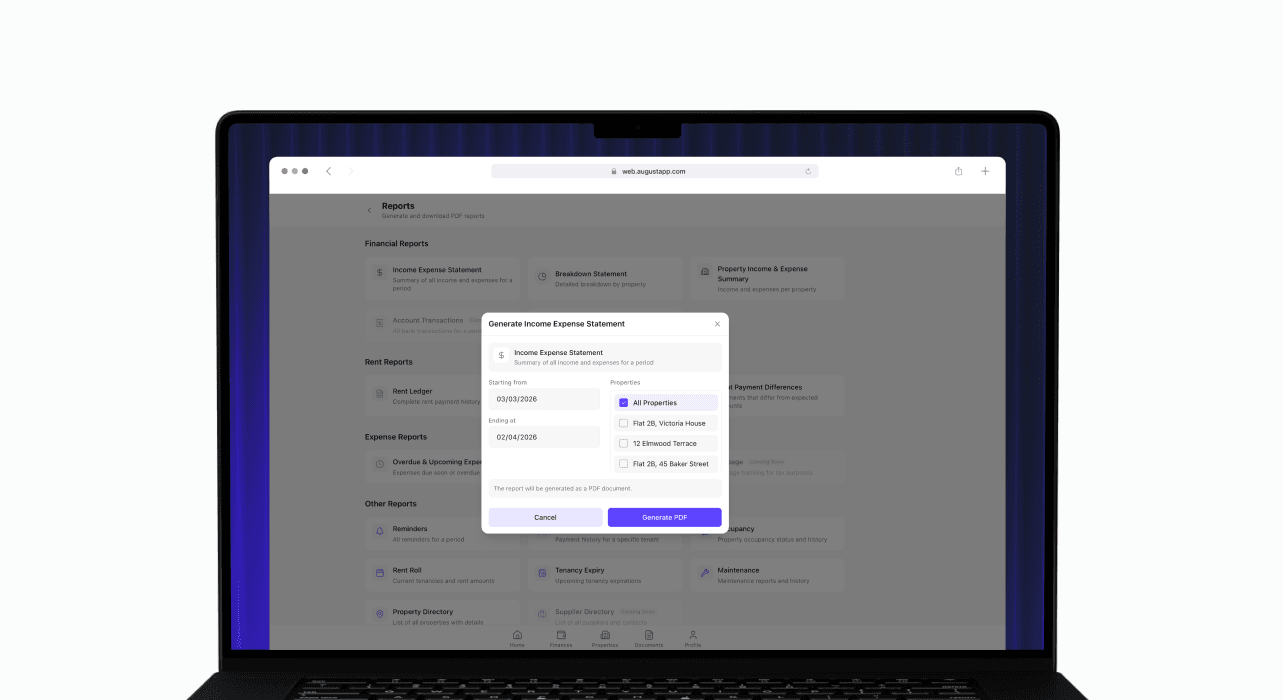
Report generation (Financial, Property and Tenancy)
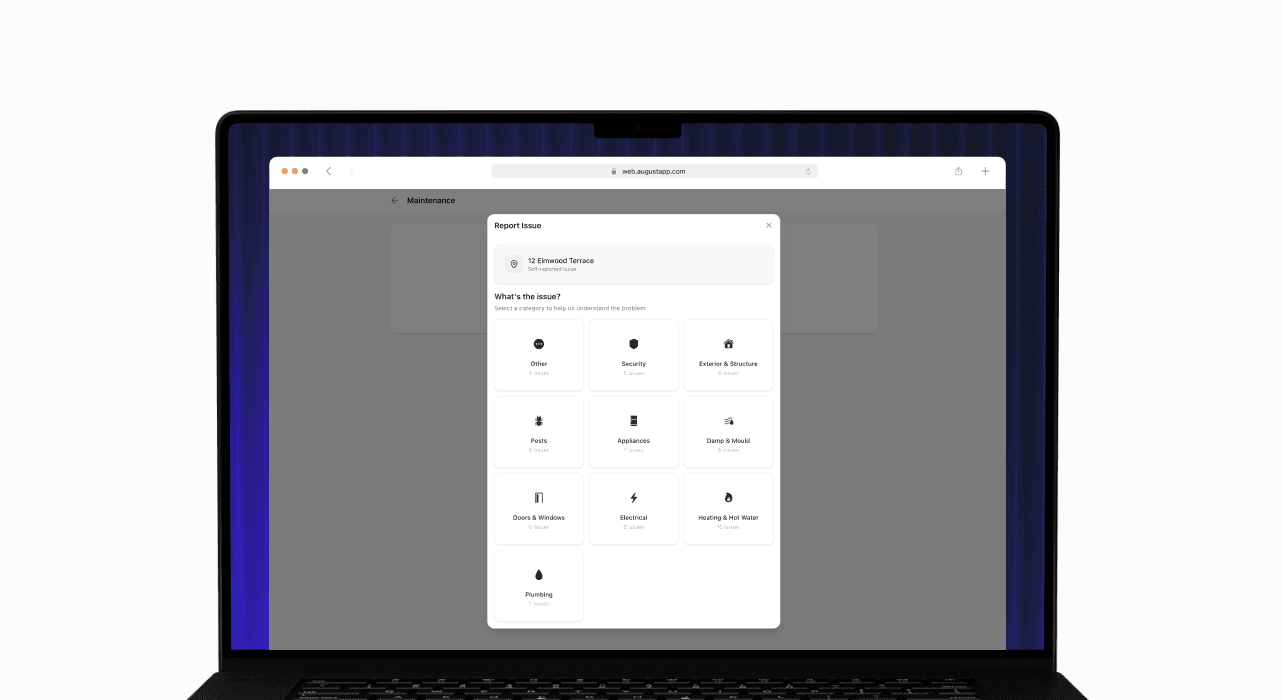
Maintenance Wizard
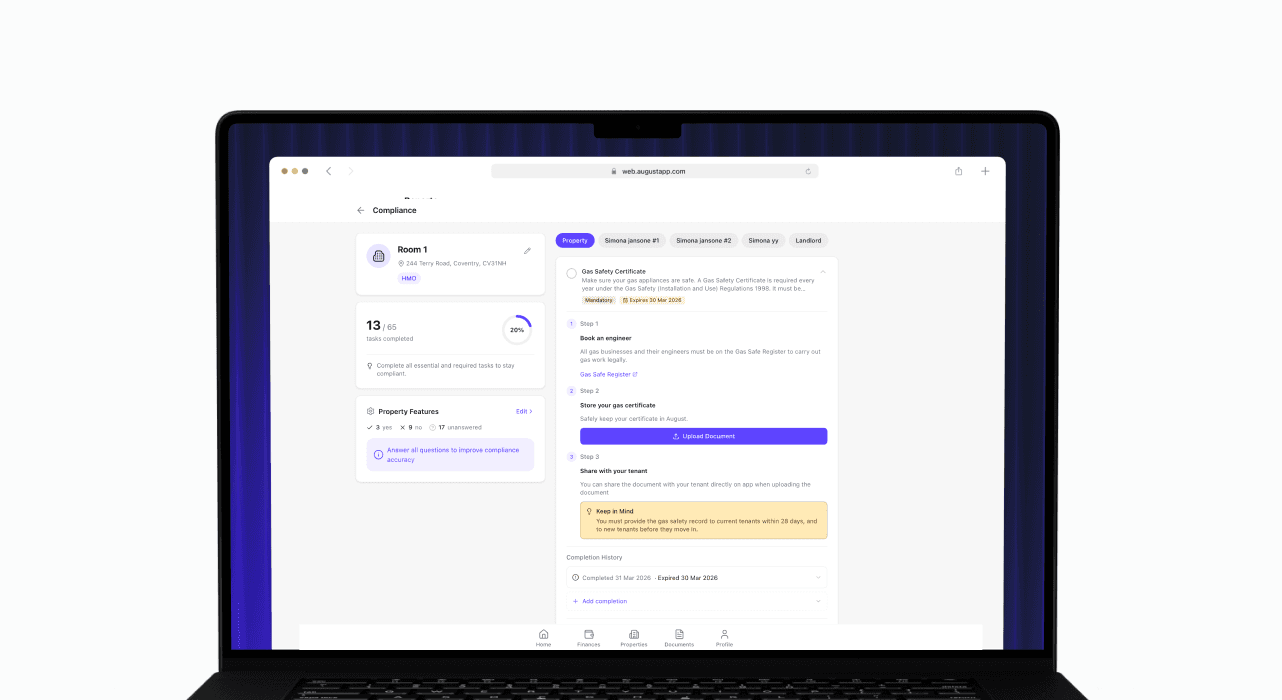
Compliance (version 2)
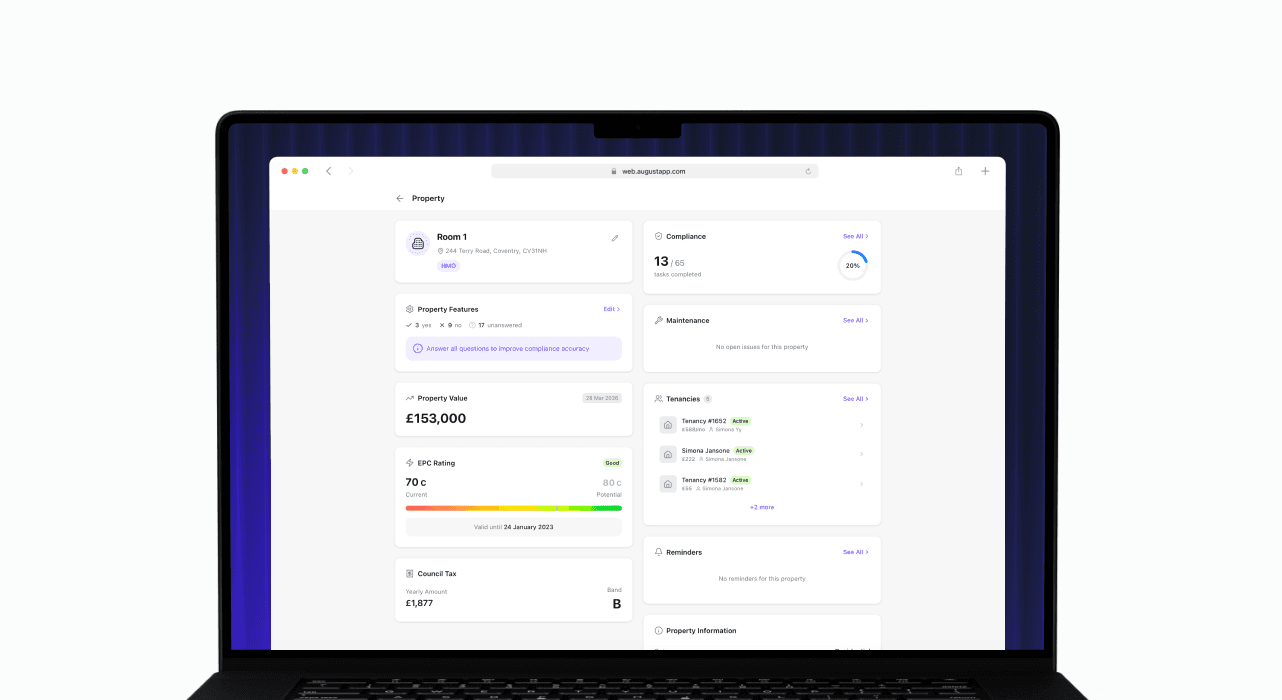
Property page redesign
Reports, Maintenance Wizard, and Property Page Redesign
This release brings PDF report generation, a new guided maintenance reporting experience, further compliance improvements, and a significant redesign of the property page, moving from a tab-based layout to a cleaner widget-based view.
What’s included
PDF report generation – You can now generate and download PDF versions of your Income/Expense Statement and Breakdown Statement directly from the app, making it easier to share financial records with accountants or keep for your own files.
Maintenance Wizard – A new guided maintenance reporting flow walks through diagnosing the issue step by step before a report is submitted. The wizard also incorporates property features, giving more relevant context to each report.
Compliance V2 improvements – Further refinements to the compliance experience, including UI improvements throughout and the ability to mark tasks as not applicable with a recorded reason, useful for properties where certain requirements do not apply.
Property page redesign – The property page has moved from a tab-based layout to a widget-based design, surfacing the information most relevant to you more directly and making it easier to navigate your property at a glance.
Property features – Property features are now accessible via a dedicated modal and widget, with impact hints to help you understand how each feature may affect your compliance obligations or management tasks.
Report generation (Financial, Property and Tenancy)
Maintenance Wizard
Compliance (version 2)
Property page redesign
Web 1.5
12 March 2026
Limits and upgrade banners
Limits and upgrade banners
This release brings PDF report generation, a new guided maintenance reporting experience, further compliance improvements, and a significant redesign of the property page, moving from a tab-based layout to a cleaner widget-based view.
What’s included
Plan limit indicators – August now surfaces your current usage against plan limits, giving you a clear picture of where you are before you hit a ceiling.
Upgrade banners – Contextual banners appear at the right moments to highlight what's available on higher tiers, making it easy to upgrade when the time is right.
Limits and upgrade banners
This release brings PDF report generation, a new guided maintenance reporting experience, further compliance improvements, and a significant redesign of the property page, moving from a tab-based layout to a cleaner widget-based view.
What’s included
Plan limit indicators – August now surfaces your current usage against plan limits, giving you a clear picture of where you are before you hit a ceiling.
Upgrade banners – Contextual banners appear at the right moments to highlight what's available on higher tiers, making it easy to upgrade when the time is right.
Web 1.4
23 February 2026
Financial Reports
Financial Reports
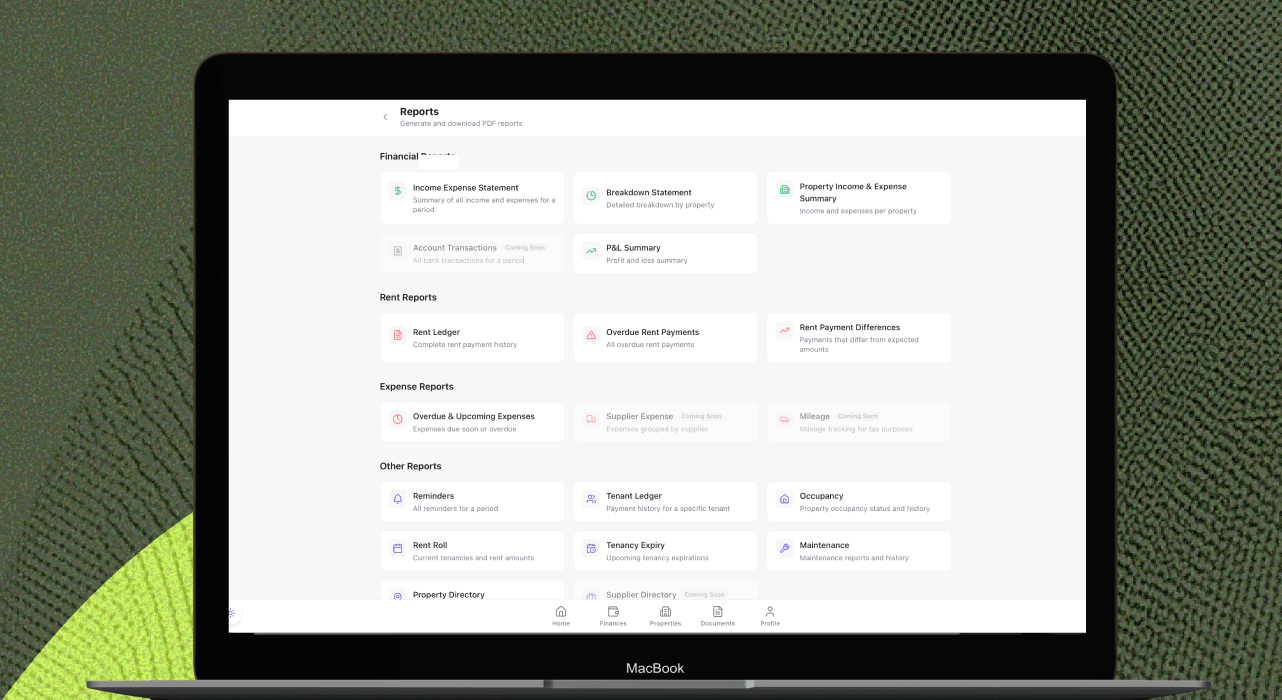
The Financial Reports update gives you clearer visibility into your portfolio performance and makes it easier to review and share key financial information. Generate useful reports in just a few clicks, and view them more smoothly with reports now opening in a new tab.
What’s included
Expanded Reports – Access financial reports including Income/Expense Statements, Breakdown Statements, and more, helping you understand performance and track your records more easily.
Improved PDF viewing – Reports now open in a new tab, making them easier to read, download, and review without interrupting your workflow.
Financial Reports
The Financial Reports update gives you clearer visibility into your portfolio performance and makes it easier to review and share key financial information. Generate useful reports in just a few clicks, and view them more smoothly with reports now opening in a new tab.
What’s included
Expanded Reports – Access financial reports including Income/Expense Statements, Breakdown Statements, and more, helping you understand performance and track your records more easily.
Improved PDF viewing – Reports now open in a new tab, making them easier to read, download, and review without interrupting your workflow.
Web 1.3
21 February 2026
Contacts, Tax and Bank Management
Contacts, Tax and Bank Management
The Contacts, Tax and Bank Management update helps you keep records organised, stay on top of compliance, and manage your connected accounts more easily. You can now manage contacts and property notes, submit quarterly tax updates through HMRC integration, and make changes to your bank connections.
What’s included
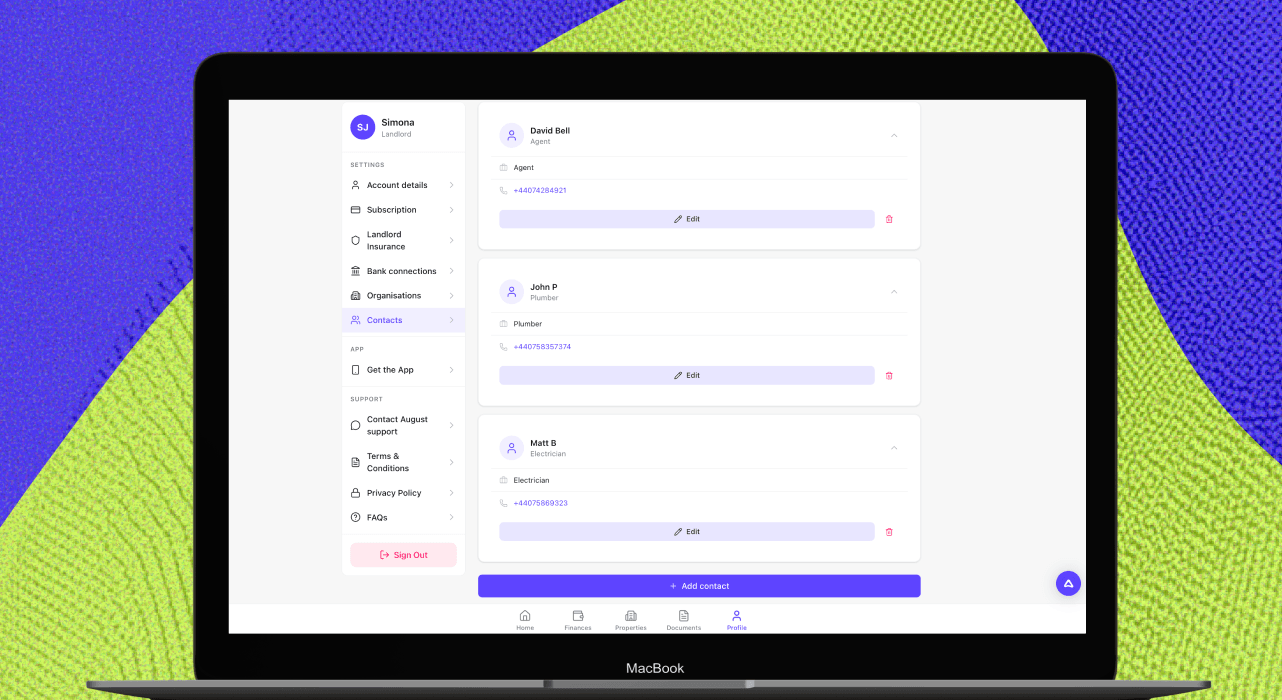
Contacts Directory – Manage your contacts in one place, making it easier to store and find important details for contractors, agents, and other trusted services.
Property Notes – Add notes to your properties so key reminders and useful details are always easy to access.
Document Activity – See document activity linked to properties and tenancies, so you have better visibility of what has been added or updated.
Tenant Sharing – Share documents with tenants directly, making it easier to keep everyone informed and access the right paperwork.
Making Tax Digital (MTD) support – HMRC integration enables quarterly tax submissions and reporting, helping you prepare for and manage Making Tax Digital requirements more easily.
Bank connection management – You can now edit and delete bank connections, giving you more control over how your accounts are linked and maintained.
Contacts, Tax and Bank Management
The Contacts, Tax and Bank Management update helps you keep records organised, stay on top of compliance, and manage your connected accounts more easily. You can now manage contacts and property notes, submit quarterly tax updates through HMRC integration, and make changes to your bank connections.
What’s included
Contacts Directory – Manage your contacts in one place, making it easier to store and find important details for contractors, agents, and other trusted services.
Property Notes – Add notes to your properties so key reminders and useful details are always easy to access.
Document Activity – See document activity linked to properties and tenancies, so you have better visibility of what has been added or updated.
Tenant Sharing – Share documents with tenants directly, making it easier to keep everyone informed and access the right paperwork.
Making Tax Digital (MTD) support – HMRC integration enables quarterly tax submissions and reporting, helping you prepare for and manage Making Tax Digital requirements more easily.
Bank connection management – You can now edit and delete bank connections, giving you more control over how your accounts are linked and maintained.
Web 1.2
31 January 2026
Bank Connections and Setup Improvements
Bank Connections and Setup Improvements
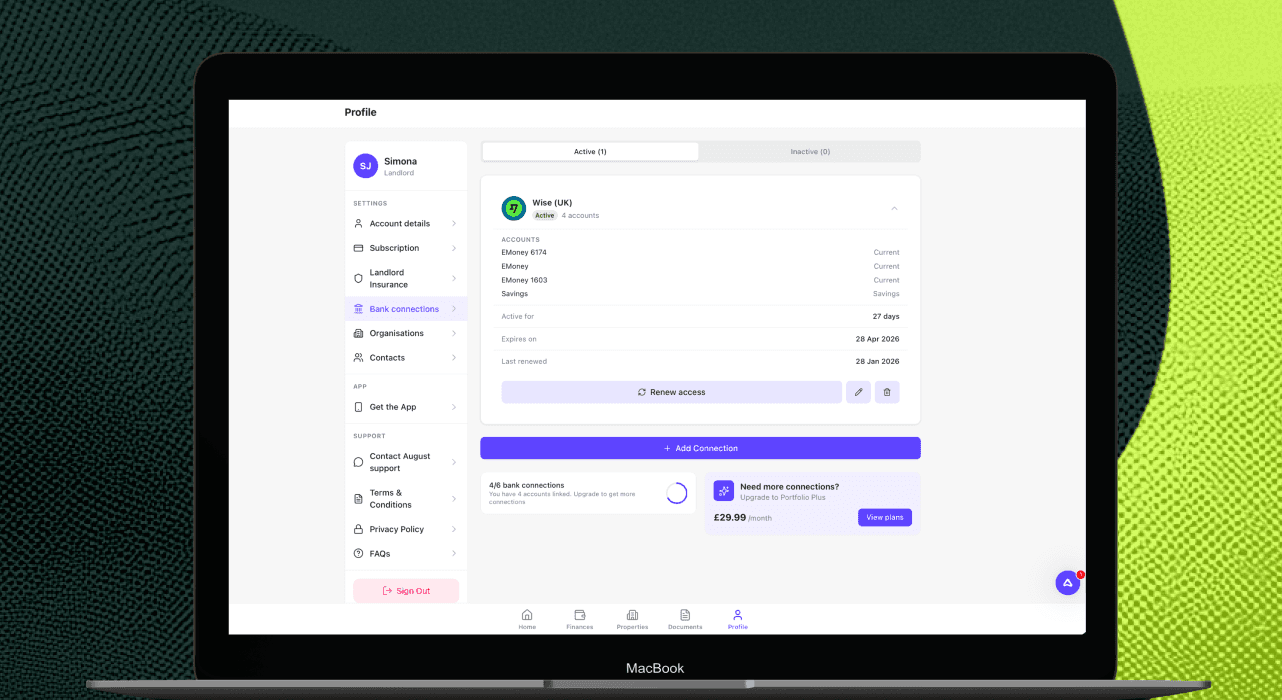
The Bank Connections and Setup improvements update makes onboarding smoother and brings the web experience closer to mobile. You can now connect a bank account through Plaid on web, use guided setup cards and capture richer property details from the start.
What’s included
Bank connections on web via Plaid - You can now link a bank account from the web app using Plaid, with the same core connection flow as mobile.
Setup cards - New setup cards guide users through key actions such as adding a property, adding a bank account and completing KYC, making onboarding clearer and easier to follow.
Expanded property details - Property setup now includes richer details and classifications, including options such as residential, office and shared ownership, helping records better reflect key property types.
Bank Connections and Setup Improvements
The Bank Connections and Setup improvements update makes onboarding smoother and brings the web experience closer to mobile. You can now connect a bank account through Plaid on web, use guided setup cards and capture richer property details from the start.
What’s included
Bank connections on web via Plaid - You can now link a bank account from the web app using Plaid, with the same core connection flow as mobile.
Setup cards - New setup cards guide users through key actions such as adding a property, adding a bank account and completing KYC, making onboarding clearer and easier to follow.
Expanded property details - Property setup now includes richer details and classifications, including options such as residential, office and shared ownership, helping records better reflect key property types.
Web 1.1
27 January 2026
Web for Desktop
Web for Desktop
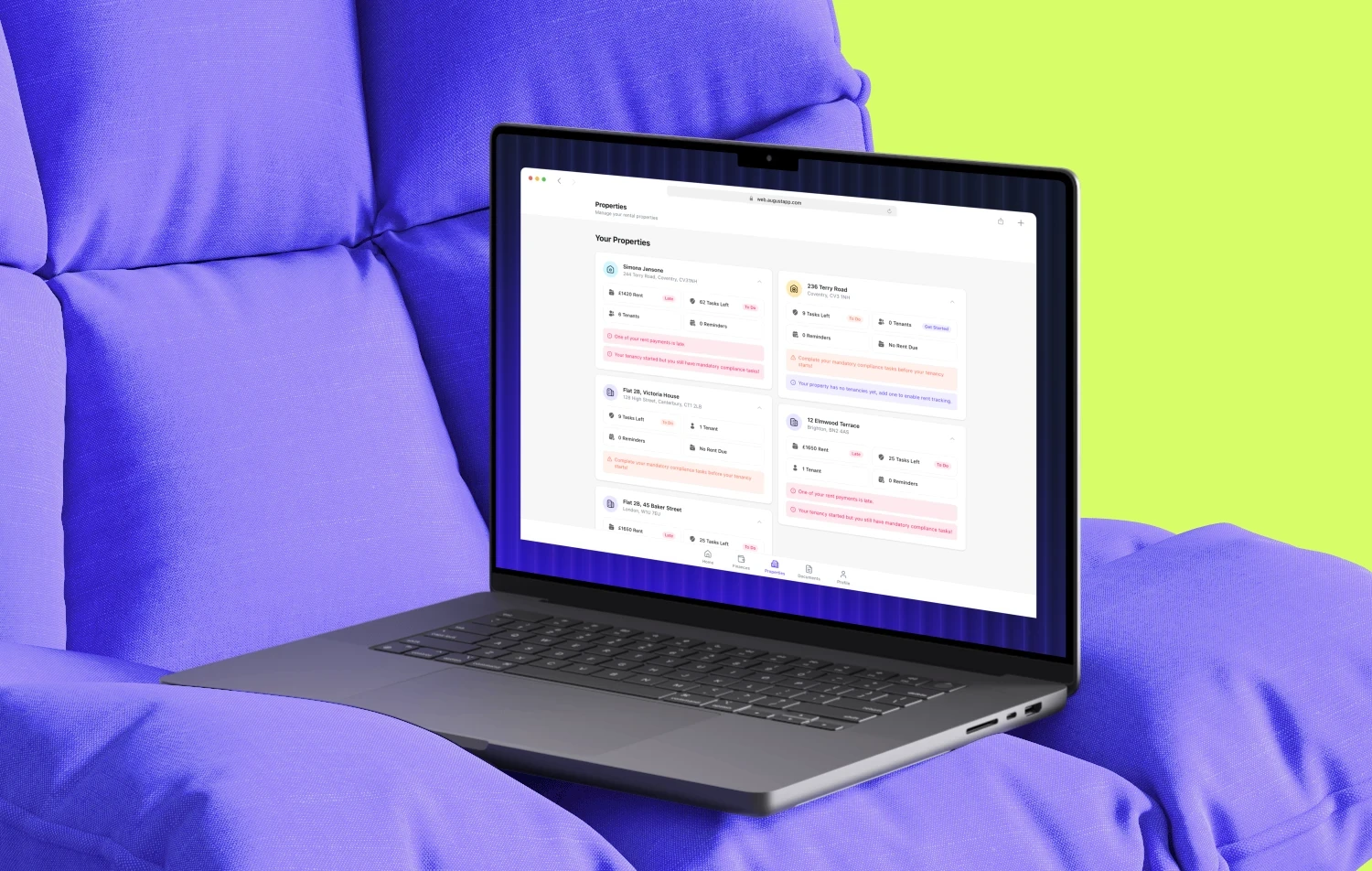
August now works on desktop, so you can manage your properties and tenancies from any web browser on your computer, with the full August experience optimised for larger screens.
Whether you’re doing monthly reviews at your desk or need to quickly check something on your phone, desktop web makes it easier to stay organised, move faster, and keep everything in sync.
Desktop web is built for how landlords work
Rental admin often happens on a computer: reviewing multiple properties, downloading documents, updating records, or preparing information for an accountant. Desktop web gives you more space, clearer visibility and a smoother workflow — without losing the convenience of mobile.
What’s included
Full desktop experience - All the features you already use in the August app are now available on desktop, redesigned for bigger screens so it’s easier to navigate and get things done efficiently.
Built for bigger portfolios - Manage multiple properties more effectively with better visibility across your entire portfolio, so you can spot what needs attention and stay on top of your admin.
Upload documents directly - Drag and drop documents from your computer straight into August — fast, simple, and a better way to keep paperwork organised.
Syncs with your phone - Seamlessly pick up where you left off. Start on desktop, continue on mobile, and vice versa — your account stays up to date across devices.
Get started
Open August in any web browser on your computer and sign in as normal. Everything syncs automatically with your phone, so you can work in the way that suits you.
Web for Desktop
August now works on desktop, so you can manage your properties and tenancies from any web browser on your computer, with the full August experience optimised for larger screens.
Whether you’re doing monthly reviews at your desk or need to quickly check something on your phone, desktop web makes it easier to stay organised, move faster, and keep everything in sync.
Desktop web is built for how landlords work
Rental admin often happens on a computer: reviewing multiple properties, downloading documents, updating records, or preparing information for an accountant. Desktop web gives you more space, clearer visibility and a smoother workflow — without losing the convenience of mobile.
What’s included
Full desktop experience - All the features you already use in the August app are now available on desktop, redesigned for bigger screens so it’s easier to navigate and get things done efficiently.
Built for bigger portfolios - Manage multiple properties more effectively with better visibility across your entire portfolio, so you can spot what needs attention and stay on top of your admin.
Upload documents directly - Drag and drop documents from your computer straight into August — fast, simple, and a better way to keep paperwork organised.
Syncs with your phone - Seamlessly pick up where you left off. Start on desktop, continue on mobile, and vice versa — your account stays up to date across devices.
Get started
Open August in any web browser on your computer and sign in as normal. Everything syncs automatically with your phone, so you can work in the way that suits you.

Your portfolio deserves better than a spreadsheet.
Join 3,000+ UK Landlords and Tenants who track compliance, collect rent, and manage all their properties from one dashboard.
No credit card required · Free for up to 2 tenancies · No commitment
Your portfolio deserves better than a spreadsheet.
Join 3,000+ UK Landlords and Tenants who track compliance, collect rent, and manage all their properties from one dashboard.
No credit card required · Free for up to 2 tenancies · No commitment
Your portfolio deserves better than a spreadsheet.
Join 3,000+ UK Landlords and Tenants who track compliance, collect rent, and manage all their properties from one dashboard.
No credit card required · Free for up to 2 tenancies · No commitment