Getting Started

Getting Started
August is your all-in-one rental app, designed for both Landlords and Tenants. In this guide, we’ll take you through how to set up your Landlord account to get the most out of the August app.
Pay and get paid, seamlessly report and track issues, access everything on the go. Renting has never been so easy...
Creating your account
To get started with your Landlord account, you’ll need a mobile phone number. Once you've entered this, you can easily review and accept our Terms and Conditions before adding a few more details to get your account up and running.
Connecting your bank account
Now let’s connect your bank account to ensure that you can easily track your rent payments through August. August is an agent of Plaid Financial Ltd, an authorised payment institution regulated by the Financial Conduct Authority under the Payment Services Regulations 2017 (firm Reference Number: 804718).
To connect your bank account, go to Profile → Bank connections and tap Connect bank account. August will explain why the connection is needed, then you’ll continue securely through Plaid, you’ll be able to authorise this through the banking app on your phone. Choose your bank, authorise the connection in your banking app, and select the accounts you want to connect.
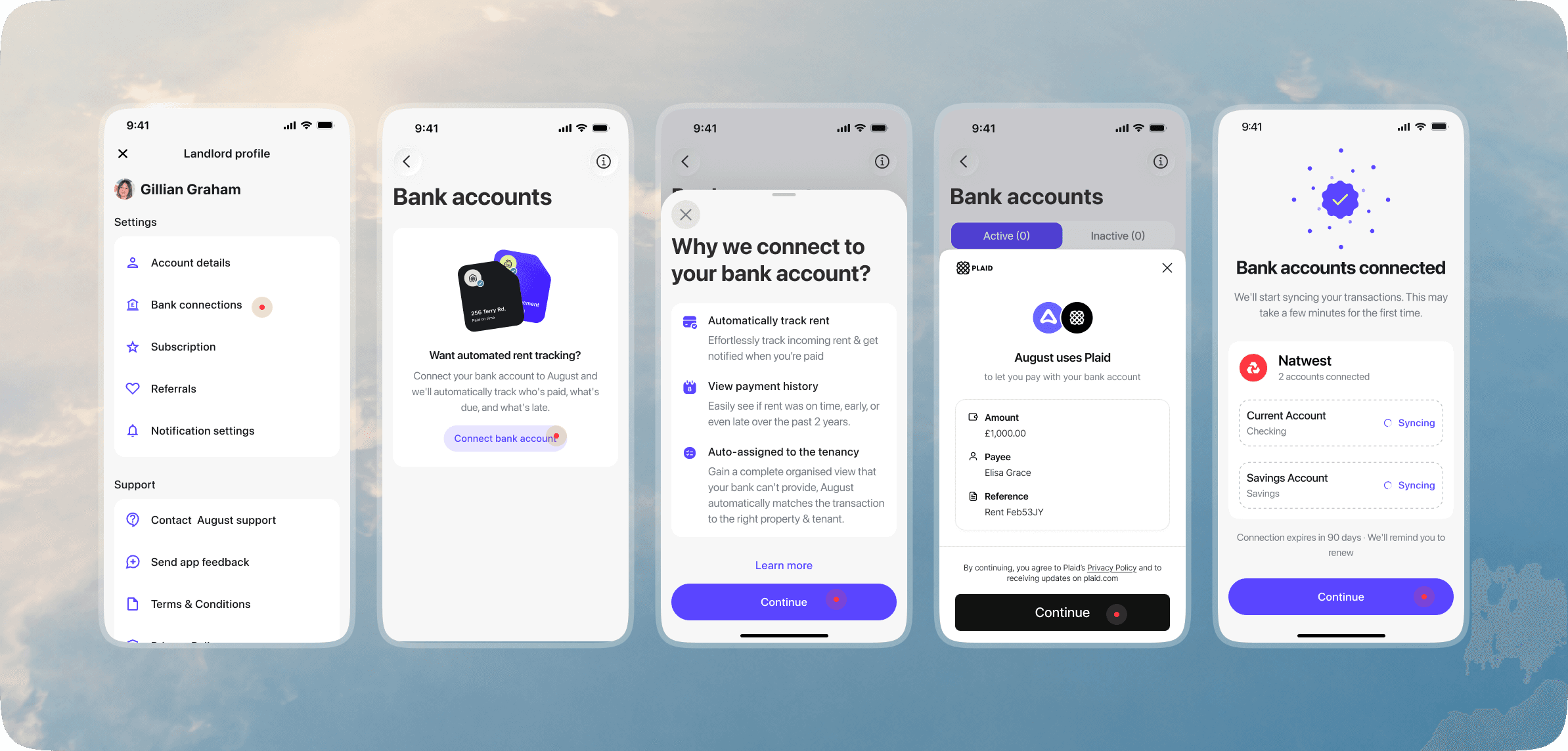
Once connected, August will start syncing your transactions. This may take a few minutes the first time. August uses your bank connection to automatically track incoming rent, view payment history, and match payments to the right property and tenancy.
August does not move money or take payments on your behalf. All rent payments are still made directly between you and your tenants’ bank accounts.
Bank connections expire after 90 days. We’ll remind you when it’s time to reconnect.
Adding a property
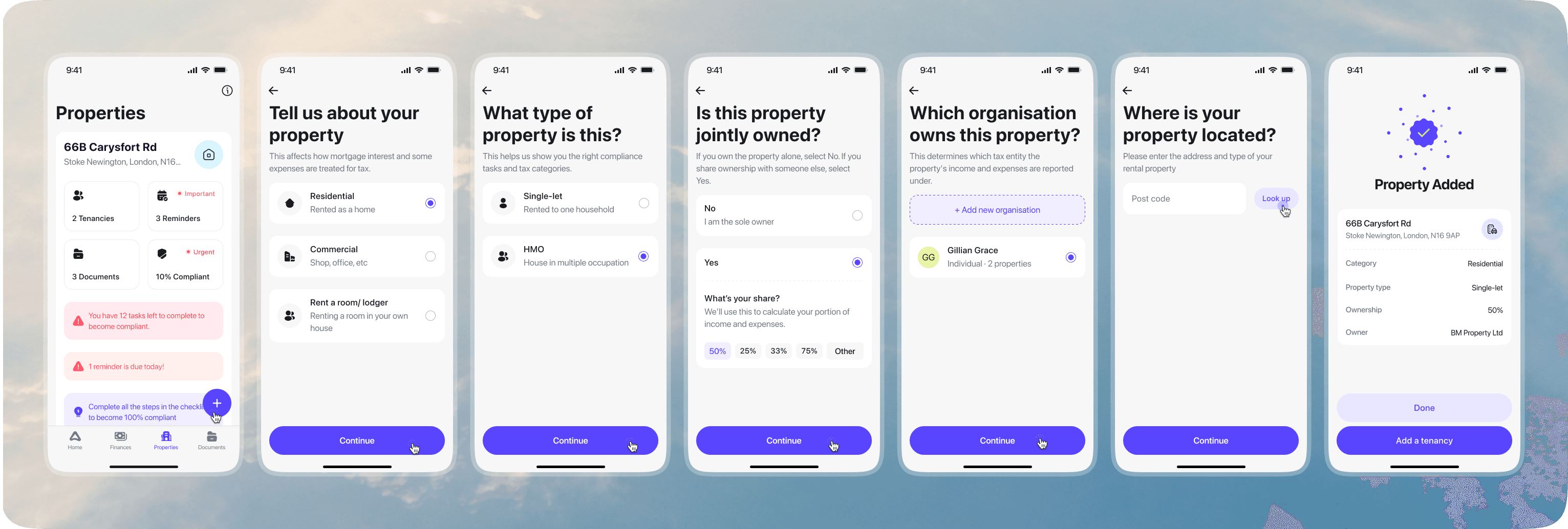
To add a property, go to Properties and tap the + button.
You’ll be guided through a few quick questions about your rental property. August will ask you to confirm the property category, property type, ownership details, and which person or organisation owns the property.
These details are important for Making Tax Digital. They help August understand how the property’s income and expenses should be organised, so your records are clean and ready to submit if you choose to use August for MTD reporting.
By default, August creates an organisation using the account holder’s name. Make sure this information is accurate. If the property is owned through a company, such as a limited company or LLC, you can add that organisation instead.
You’ll then enter the property address using the postcode lookup. Once the property is added, you’ll see a summary with the property address, category, property type, ownership share, and owner.
After adding the property, you can continue by adding a tenancy. This helps August set up rent tracking, compliance tasks, documents, and reminders for the correct property.
Note: If you need to delete a property, you’ll need to delete your tenancy first
Pro tip: You can create multiple properties or tenancies by simply uploading PDFs of your tenancy agreements. August Intelligence will fill in all the details for you.
Creating a tenancy and adding tenants
After adding a property, you can add a tenancy so August can track rent, match payments, and keep the right records for that rental.
Within August, the lead Tenant will be responsible for paying rent. We suggest if you have a property with multiple Tenants paying rent, appoint one of them as the lead Tenant.
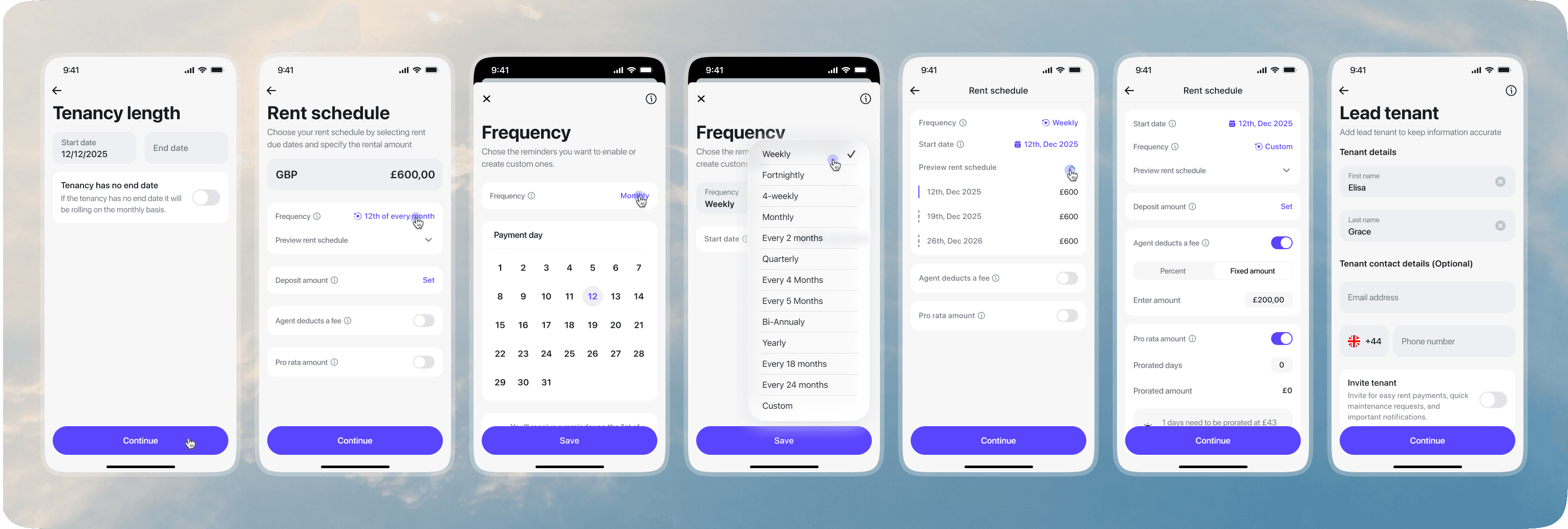
First, enter the tenancy start date. If the tenancy has no end date, leave the end date blank and August will treat it as a rolling tenancy.
Next, set the rent schedule. This is important because August uses the rent schedule to automatically match incoming rent payments to the correct tenancy.
August will suggest a rent schedule based on the tenancy start date, paid monthly. For example, if the tenancy starts on the 12th, August will suggest rent is due on the 12th of every month.
If your rent is paid on a different day or frequency, make sure you update it before continuing. You can change the frequency, payment day, rent amount, deposit amount, agent fee settings, and any pro rata amount if needed.
Keeping the rent schedule accurate helps August understand when rent is expected, whether a payment is early, late, missing, or partially paid, and which tenancy the payment belongs to.
You’ll then add the lead tenant’s details. You can also invite the tenant to August if you want them to receive rent payment updates, maintenance requests, and important notifications.
You remain responsible for the terms of your tenancy and ensuring these are reflected when uploading to August.
To end a current tenancy, tap ‘End tenancy’. Note, this does not legally end a tenancy contract. This must be ended as per your local laws and regulations.
Rent tracking and payments
You can review rent payments from the Finance tab.
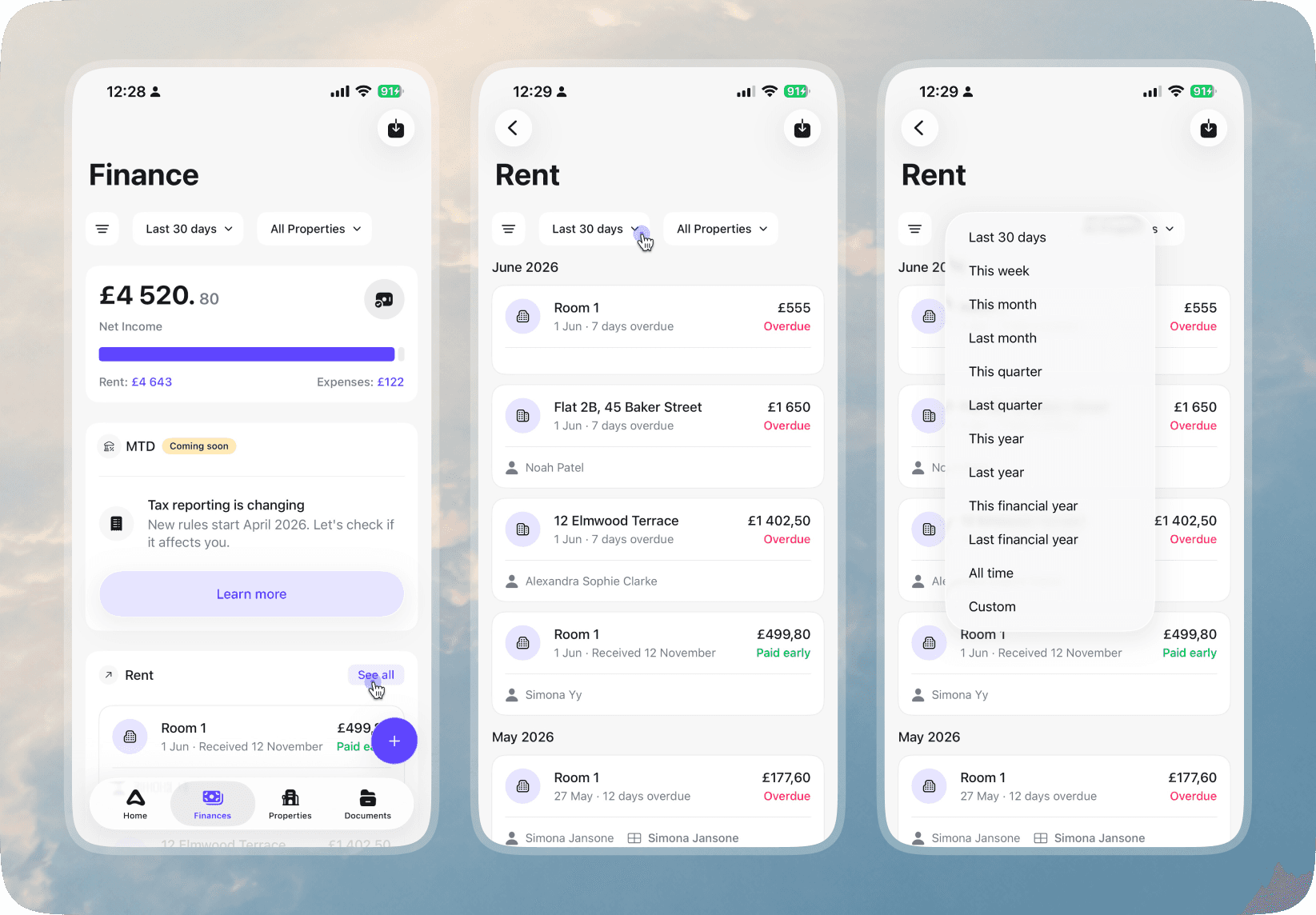
The Finance overview shows your net income, rent received, and expenses for the selected period. To see individual rent payments, go to the Rent section and tap See all.
By default, August shows rent payments from the last 30 days. You can change this using the date filter at the top of the Rent screen. Choose a preset period, such as this week, this month, this quarter, this year, the financial year, or select a custom date range.
If you want to view all rent payments, scroll to the bottom of the rent feed and tap See all time.
You can also filter by property if you only want to review rent for a specific rental.
Each rent payment shows the expected rent date, amount, tenant or property, and current status, such as paid, paid early, overdue, or unpaid. This helps you quickly understand what has been received and what is still owed.
For automatic rent matching to work correctly, make sure your bank account is connected and your rent schedule is accurate for each tenancy.
See the Rent tracking feature.
Maintenance Reporting
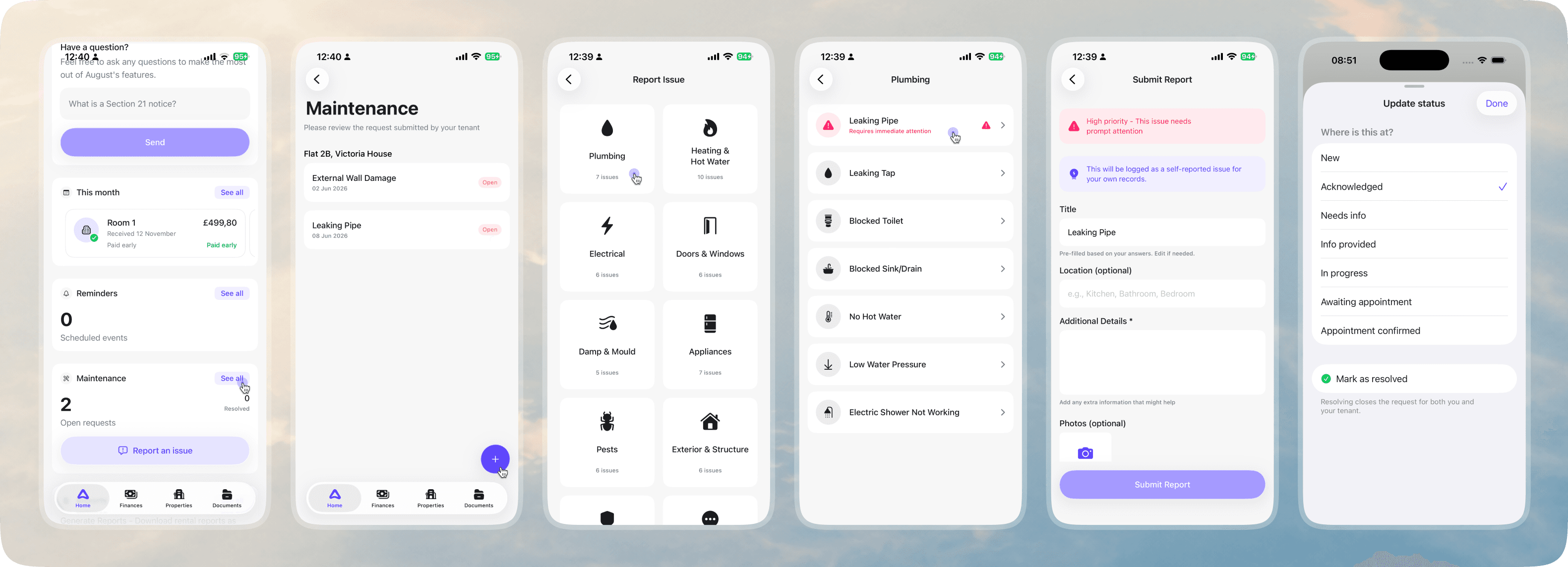
Tenants can create detailed maintenance requests in August and send them directly to you. You can also create maintenance requests yourself if you spot an issue and want to keep a record of it.
To create a request, go to the Maintenance section and tap Report an issue or the + button. Choose the issue category, select the specific problem, then add the title, location, details, and any photos.
If you create the report yourself, August will log it as a self-reported issue for your own records.
Once a request has been created, you can update its status as the issue progresses.
Keeping the status up to date helps your tenant understand what is happening without needing to chase you separately. Tenants can see the latest status in August, and you can message them directly from the app if you need more information or want to provide an update.
When the issue has been sorted, mark the request as resolved. This closes the request for both you and your tenant.
If you feel a maintenance request violates August's Trust and Safety Guidelines, you can report the request.
See the Maintenance reporting feature.
Document management and sharing
Landlords can securely share important documents like lease agreements, safety certificates, invoices, images and instruction manuals with their tenants in August.
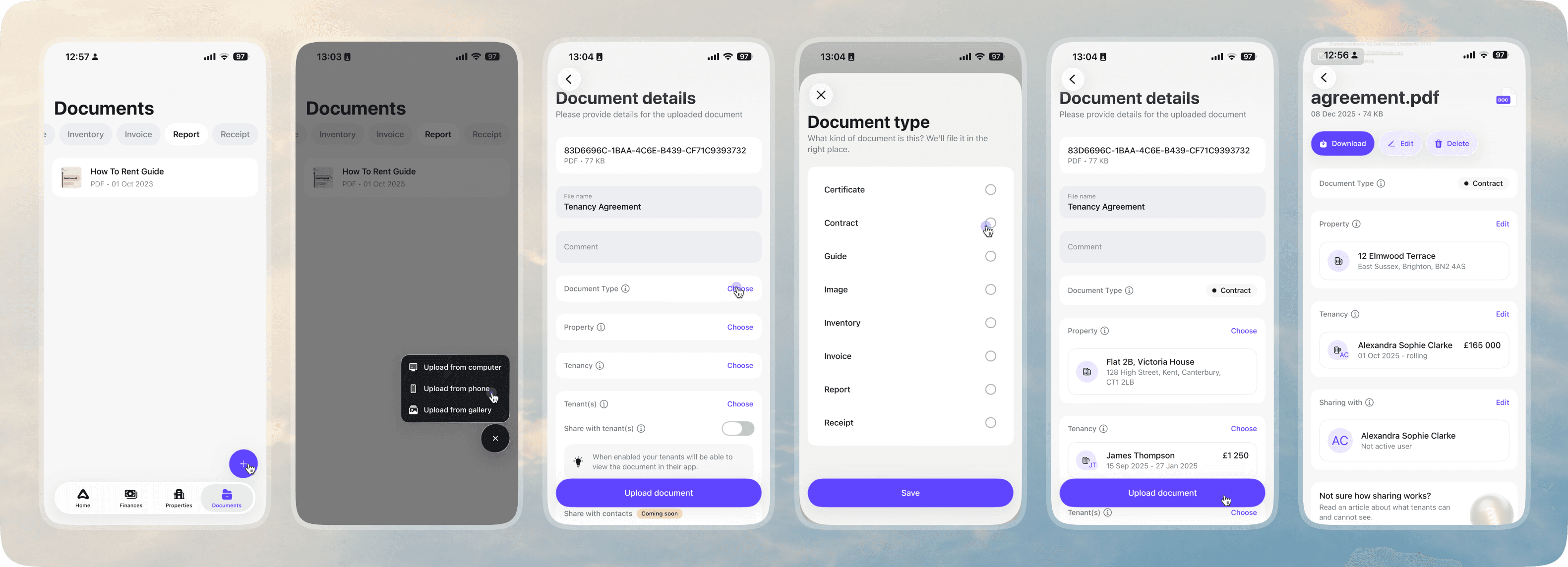
To upload a document, go to Documents and tap the + button. You can upload from your phone gallery, files, or computer. If you need to upload several documents at once, you can use Magic Upload to bulk upload documents from your computer, or use the August web app for easier document management.
After uploading, add the document details so August can file it in the right place. Choose the document type, then assign it to the relevant property, tenancy, and tenant where needed.
You can also choose whether to share the document with tenants. When sharing is enabled, tenants will be able to view the document in their own August app.
Once uploaded, you can open the document details page to download, edit, delete, or update its property, tenancy, tenant, and sharing settings.
See overview of Document management feature.
Pricing plans
To access all of August's features, just tap the subscription card on your Home screen to subscribe. August offers three pricing plans for Landlords and free for Tenants.
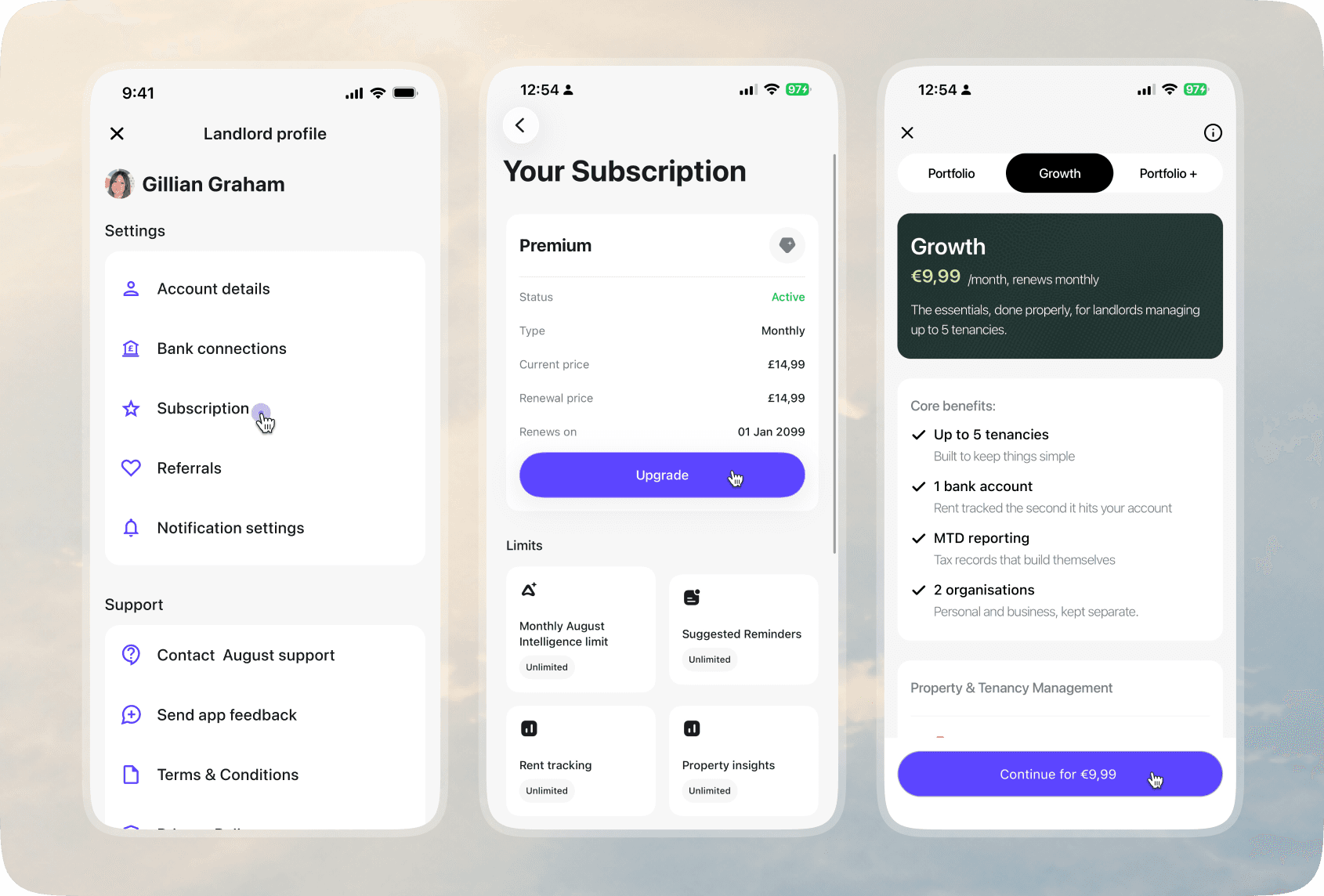
To view your current subscription, go to Profile → Subscription. Here you can see your active plan, billing type, current price, renewal price, renewal date, and the limits included in your plan.
If you want to change your plan, tap Upgrade. You’ll be able to compare the available landlord plans, including Portfolio, Growth, and Portfolio+, and see what is included before continuing.
Each plan includes different limits and features, such as the number of tenancies, bank accounts, organisations, MTD reporting, rent tracking, reminders, and property management tools.
Before subscribing or upgrading, make sure you review the plan details carefully so you choose the plan that matches how you manage your rental properties.
See Pricing Plans for Landlords.
Need some extra help?
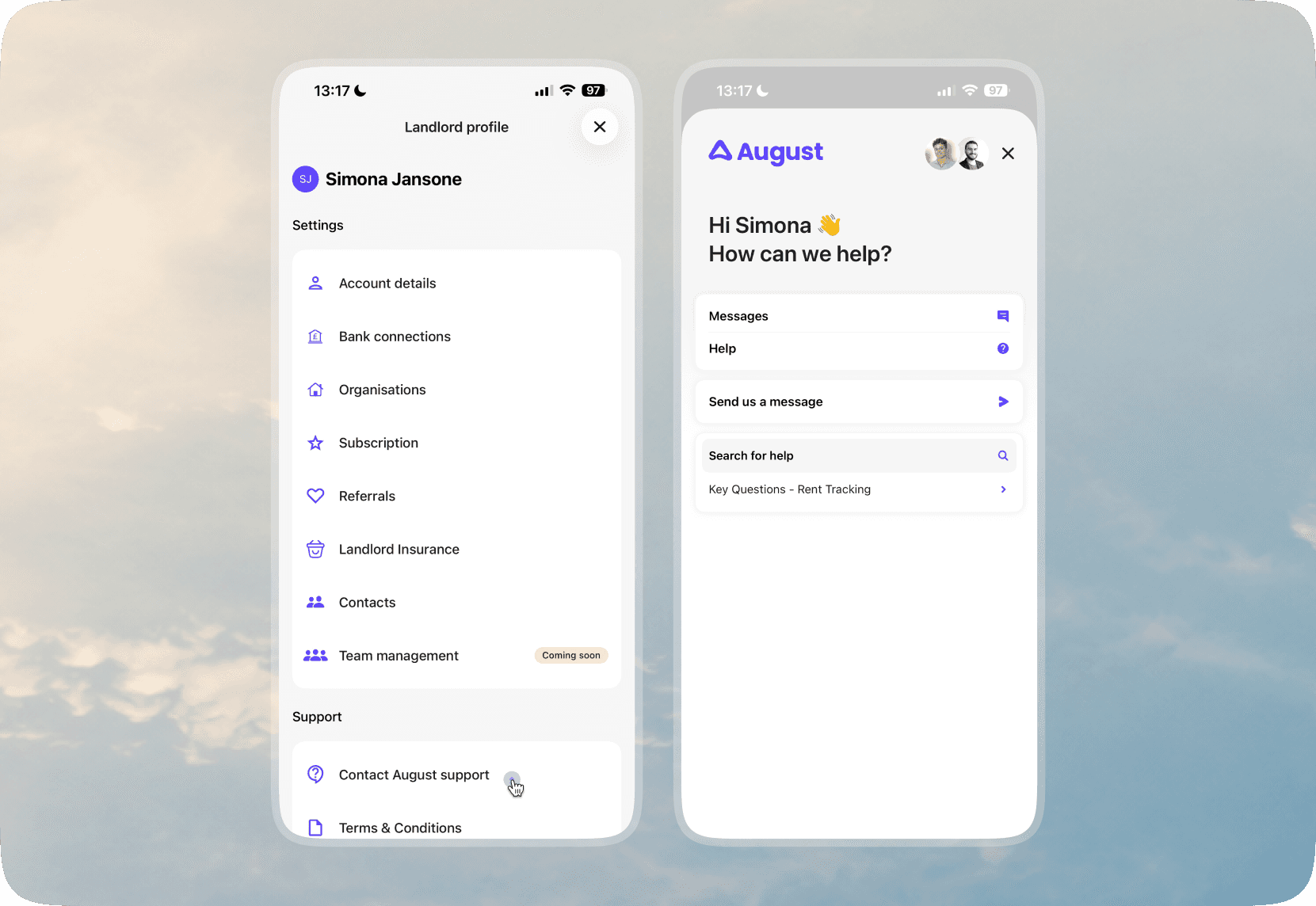
If you already have an account, it’s quicker to get support from the August app.
Tap on your Profile to chat to our dedicated Support team in real-time, send feedback, or access our in-app FAQs.
Alternatively, check out our Help page for FAQs and other ways to get in touch.
Related Articles
Check articles from the same category